Valentin CordierSébastien LagorceAlison CarminatiDiane JaurettJuliette C4.7/5 on Trustpilot · 32 reviews

Interactive webinars: get your audience involved, from the waiting room to your offer

Live chat, emoji reactions, polls, scored quizzes and participation statuses: in a Welya interactive webinar, attendees can take part from start to finish. You choose when to launch each interaction.

Get started for free

Free account, no credit card required

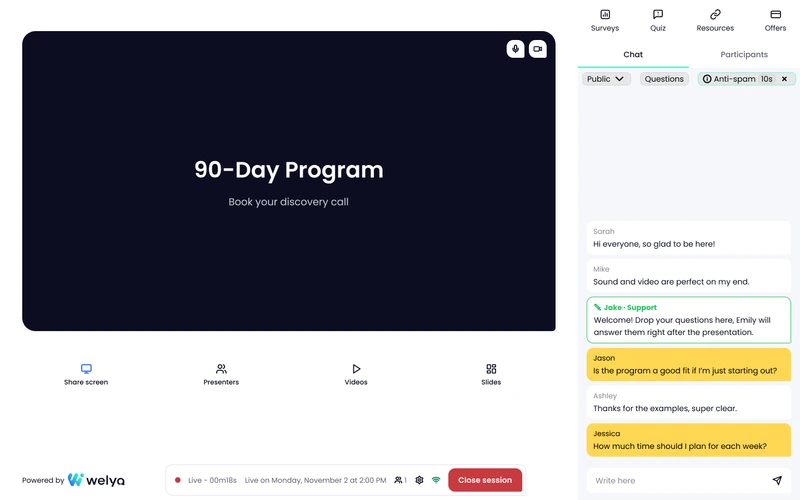
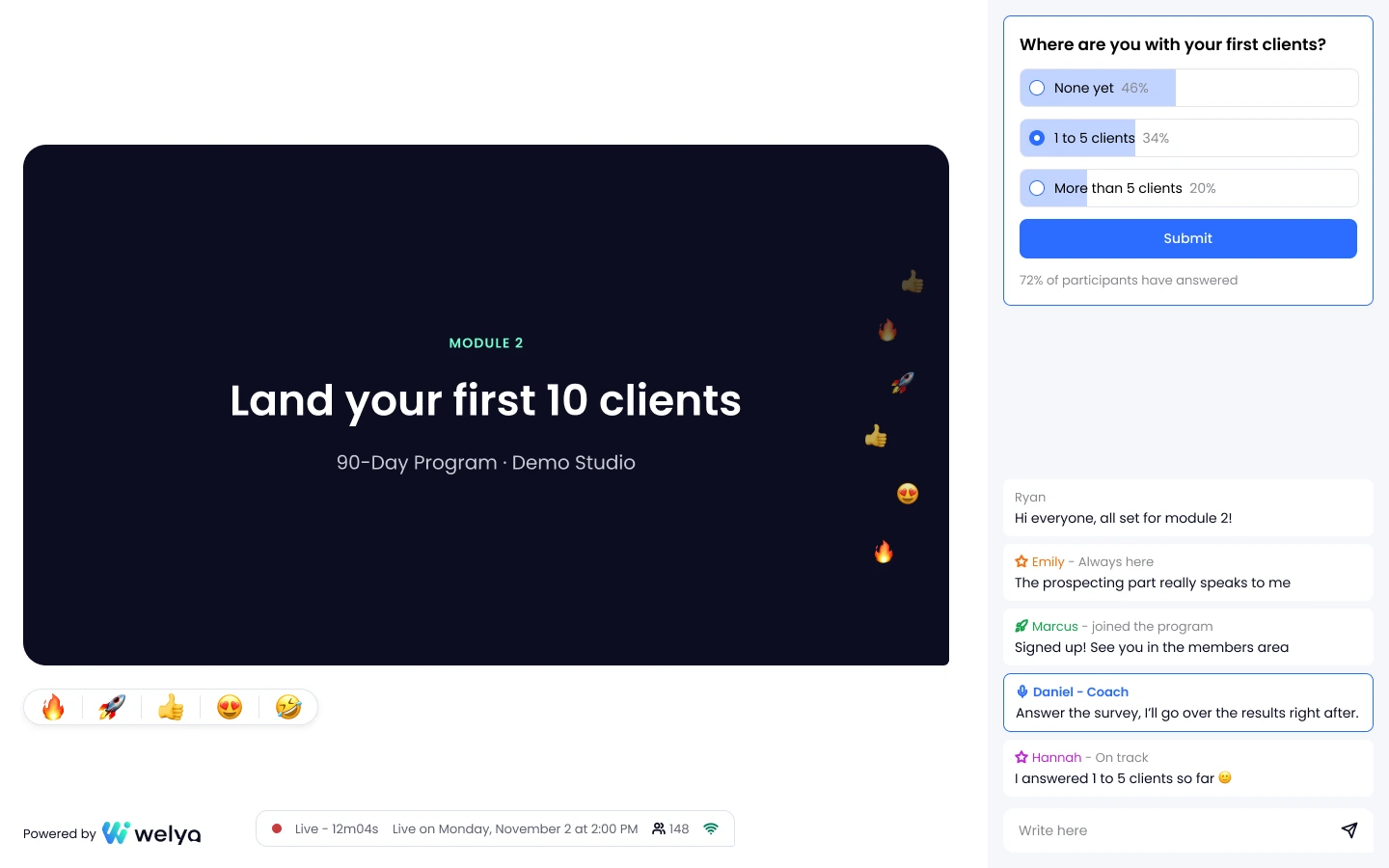
Welya live webinar, attendee view: the video, a chat with colored participation statuses next to first names, reactions and a poll with results (sample data)
  • 3chat modes you can switch during the session
  • 5emoji reactions the whole room can see
  • 2ways to stream: in the browser or on YouTube Live (from Grow)

Why host your interactive webinar on Welya

An interactive webinar is a two-way live session: attendees chat, react, vote in polls and answer quizzes instead of just watching. Welya covers the engagement tools you expect, plus a few built for webinars that end with an offer.

  • A chat you control: public, private or turned off, and you can switch at any time.
  • Live polls: ask the room a question and share the results on screen.
  • Scored quizzes: correct answers are counted for every attendee.
  • Participation statuses: the more attendees engage, the higher their status in the chat.
  • A waiting room with something to do: a countdown, who is waiting, a poll or a quiz.
  • YouTube Live from Grow: attendees keep Welya's chat, polls and quizzes around the video.

« I also see that the chat is more engaged thanks to quizzes and statuses. »

Romain JottardTrustpilot, translated from French · April 30, 2026

How it works, in 3 steps

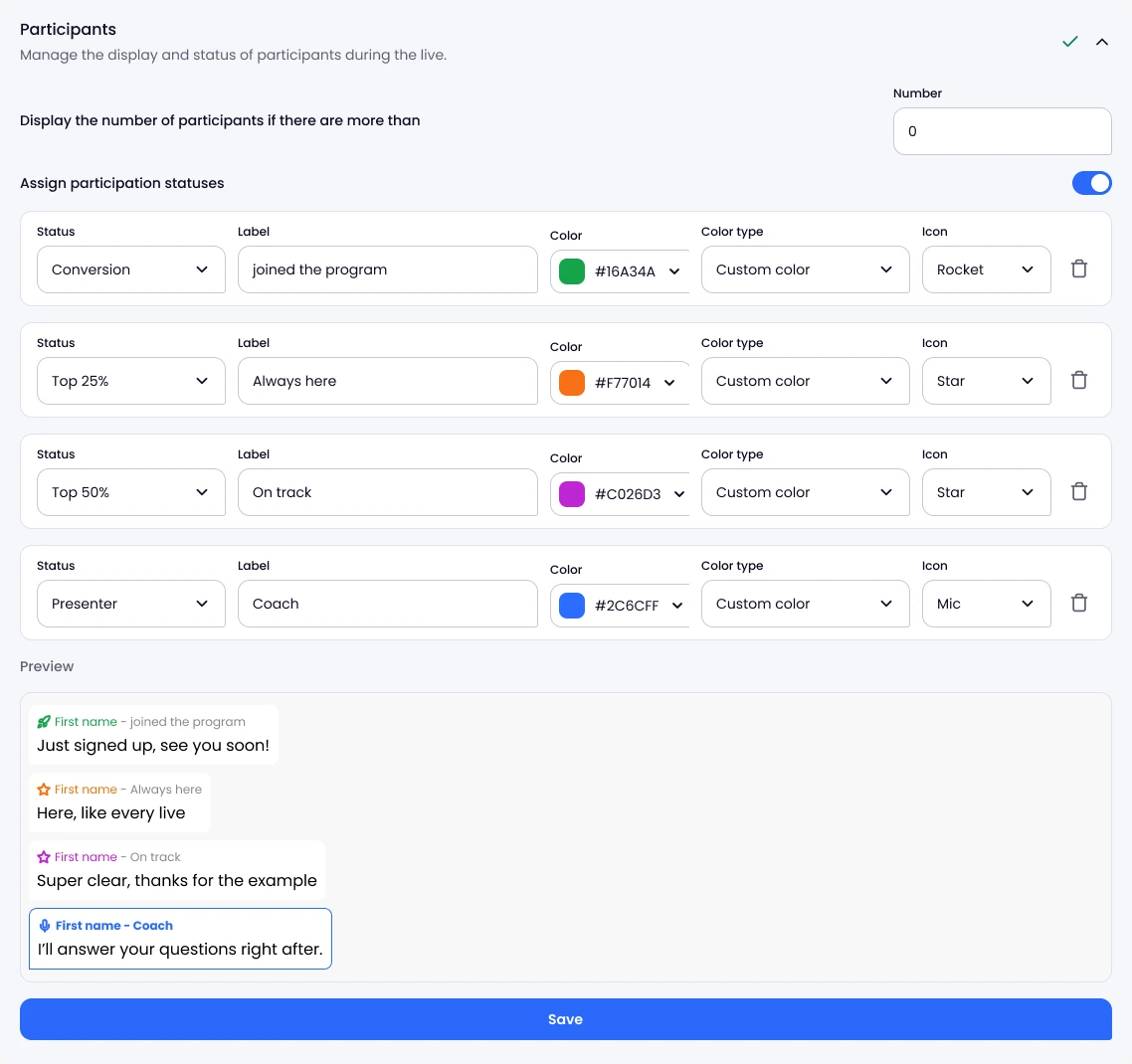
Participation status settings: a label and a color for each status, with a chat preview (sample data)

01Set up your interactions ahead of time

Everything is ready in your webinar before you go live.

  • Polls and quizzes. 2 to 6 answers, plus the correct answers for quizzes.
  • Participation statuses. A label and a color for each status, shown next to first names in the chat.
  • Your content. Slides with speaker notes, videos, files and links to share during the session.
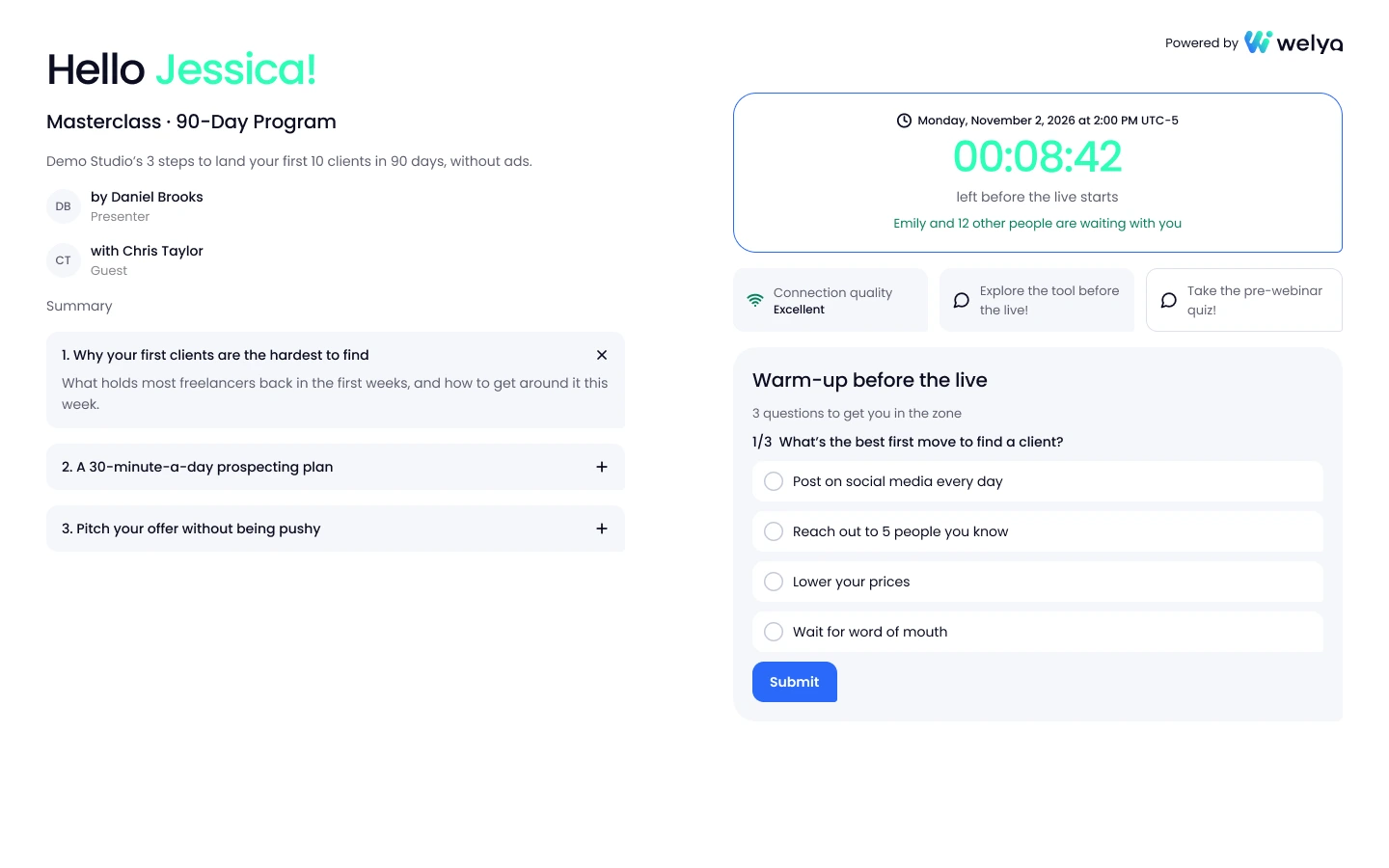
Welya waiting room: countdown, number of people waiting, agenda and a pre-webinar quiz button (sample data)

02Give the waiting room something to do

Early arrivals see what's coming and can answer a poll or a quiz before you start.

  • A countdown and an agenda. Attendees see the time left and the main points of your webinar.
  • Who is waiting. Above a threshold you set, the number of people waiting appears, with first names.
  • One warm-up activity. A poll or a quiz of your choice, plus a connection test before you start.
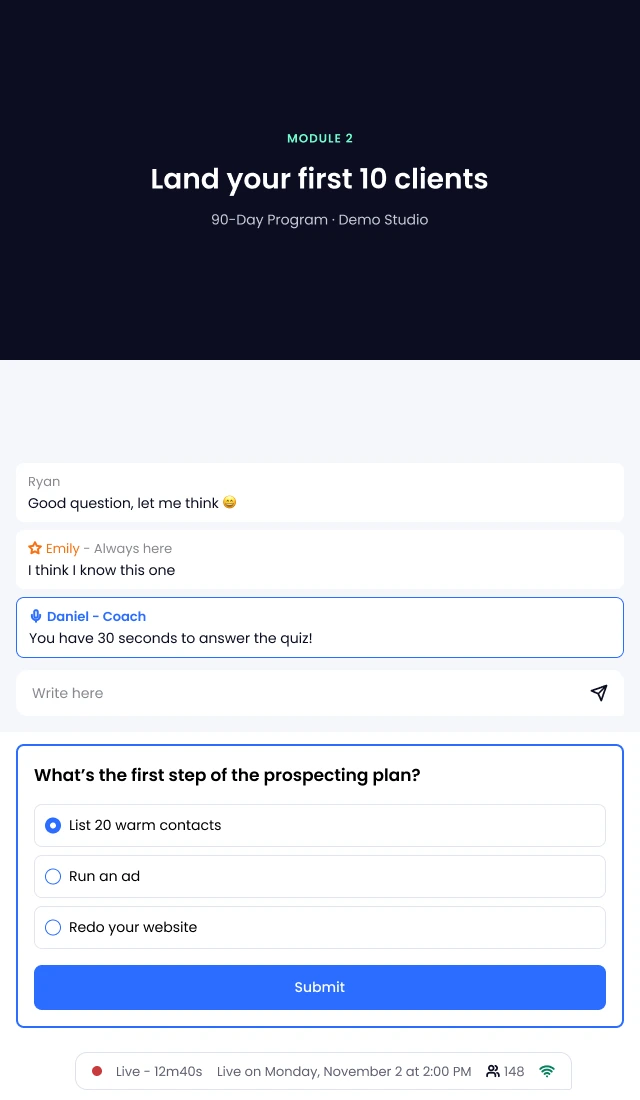
Welya live webinar on mobile: the video, the chat and a quiz at the bottom of the screen (sample data)

03Engage the room while you present

You launch each interaction when your presentation gets there.

  • One click. The poll or quiz opens for attendees on desktop and on mobile.
  • Right on cue. It appears when attendees see you announce it in the video.
  • Results on screen. Share the room's answers as percentages, if you choose to.

Every engagement tool in your live webinar

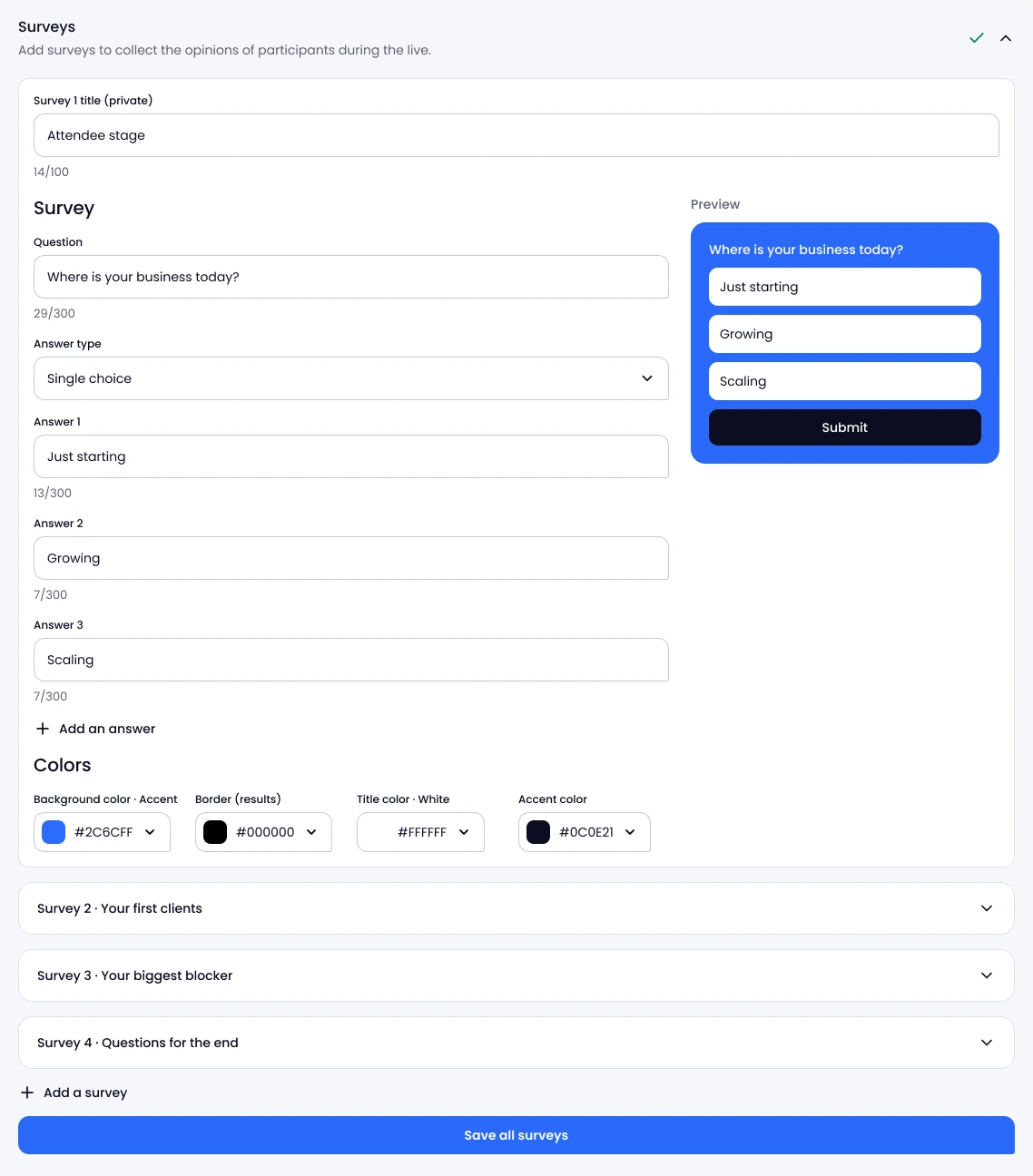
Creating a survey in Welya: question, answer type, answers and a preview of the card attendees see (sample data)

Live polls and scored quizzes

Attendees can answer in one click, no typing needed. Before a coaching offer, for example: just starting, growing or scaling?

  • Single or multiple choice. Up to 6 answers per question, launched whenever you want.
  • Results as percentages. With the share of attendees who answered, shown to the room or kept for you.
  • Quizzes with correct answers. Scored for each attendee; you can turn off the chat during a quiz.
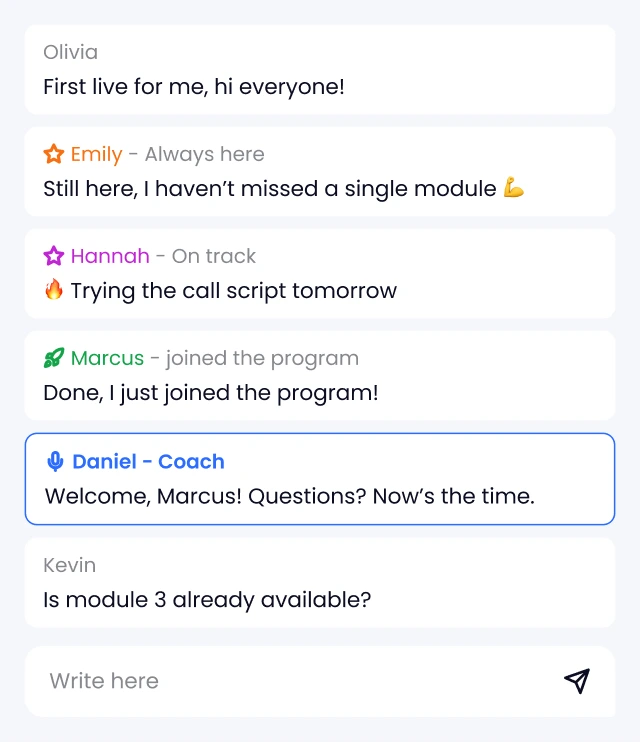
Close-up of a Welya live chat: a participation status and its color next to attendees' first names (sample data)

Participation statuses: gamification, explained

Statuses based on an engagement score: the more attendees engage, the higher their status goes.

  • A status next to each name. The statuses you set up appear in the chat, for the whole room.
  • Your labels, your colors. No. 1 to 3, Top 25, 50 or 75%, buyers: you name each one.
  • What raises the score. Messages, reactions, poll and quiz answers, offer clicks, purchases and attendance.
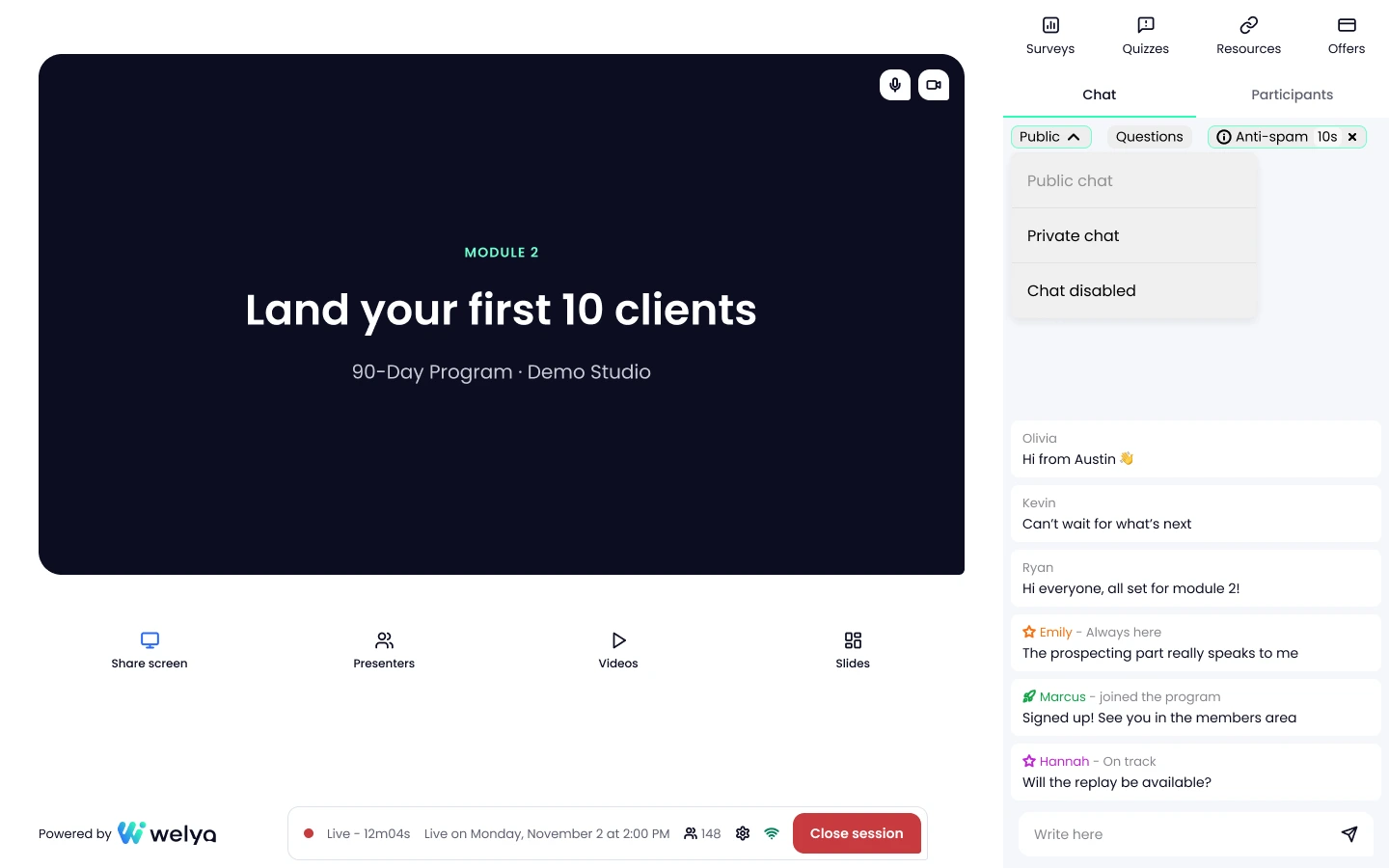
Host room: Surveys, Quizzes, Resources and Offers tabs, and the chat mode selector (sample data)

Live chat and emoji reactions

Public, private or off: you set the chat mode, and you can change it mid-session.

  • Private chat. Only your team sees attendee messages; your team's replies stay public.
  • An anti-spam delay. From 0 to 120 seconds between two messages when the chat gets busy.
  • Five live reactions. 🔥 🚀 👍 😍 🤣, floating up on screen for the whole room.
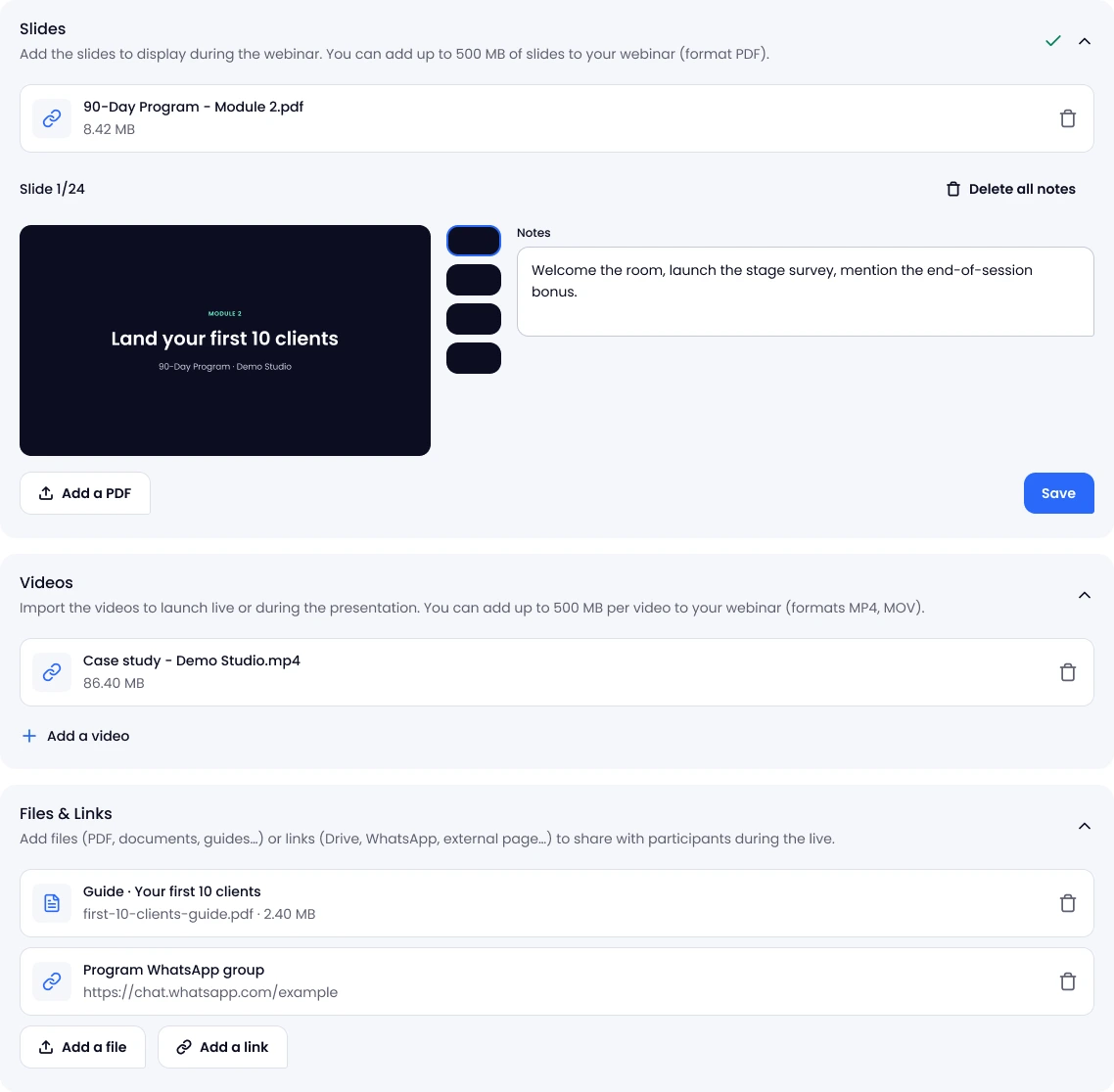
Live settings: PDF slides with speaker notes, a video, a PDF guide and a WhatsApp link (sample data)

Slides, videos, handouts and links

When you stream with Welya: 2, 4 or 6 presenters and guests on screen depending on your plan.

  • Slides and screen sharing. On your slides, speaker notes stay visible to you only.
  • Videos. Played from your host room, in sync with each attendee's stream.
  • Handouts and links. A PDF guide, a worksheet or your community link, shared during the session.
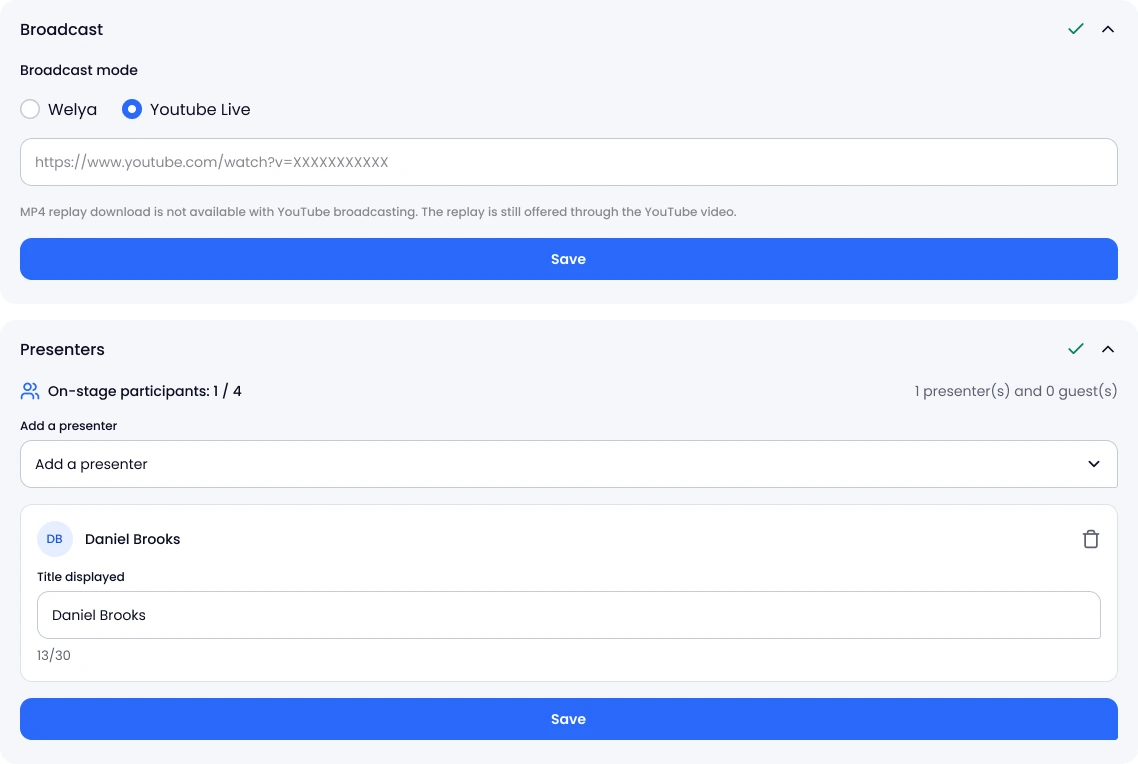
Broadcast settings: YouTube Live mode selected, the YouTube link field and the presenters section (sample data)

In the browser or on YouTube Live

Stream with Welya, or with YouTube Live from Grow: attendees watch on your Welya page, interactions included.

  • Browser-based. Attendees join without a Welya account, on desktop or mobile.
  • YouTube Live from Grow. The YouTube player sits in your Welya page, with the chat, polls and quizzes.
  • On YouTube, you present alone. Screen sharing, slides and videos go through your streaming tool.

Ready to get your audience involved?

Set up your polls, quizzes and statuses for free, no credit card required; you only need a subscription to go live. Attendees join from their browser, without a Welya account.

Get started for free

A Welya live session, with or without its interactions

FeatureVideo and public chatWith Welya interactions
Before you startA countdownYesA countdown, who is waiting, and a poll or a quiz
The chatOpen to everyoneYesPublic, private or off, switchable during the session
Your most engaged attendeesOne name among manyYesA status next to their name
A question for the roomAnswers in the chatYesA poll or a quiz, with results on screen
On desktop, an attendee about to leaveThey close the pageYesAfter two minutes in the session, if you turn it on, a pop-up asks why they're leaving; for the answers where you enabled it, it shows a QR code to keep watching on their phone

They say it better than us

Overall rating: 4.7 out of 5 on Trustpilot (32 reviews)

Reviews translated from French.

Get started for free
  • Welya is innovative, accessible and dynamic.

    Welya is innovative, accessible and dynamic. I appreciated the tool’s rich features, which make for an optimal, memorable and interactive customer experience. Above all, the people…

    Aurélie Narcisot
  • WELYA is just insane!

    Access to lots of DATA, quizzes, polls, waiting room, smooth software and rock-solid support! If you run webinars, YOU HAVE TO try WELYA!

    Sébastien Lagorce
  • Great! Excellent tools.

    Lots of data to improve our funnels. Special mention to the team, super responsive, available and really supportive. I recommend it.

    Alison Carminati
  • It’s really better than WebinarJam and everything we’ve used so far

    I’ve been using Welya for 2 months in my webinar agency, and it’s really better than WebinarJam and everything we’ve used so far (especially the lead scoring).

    Valentin Cordier
  • I use Welya for my webinars, and I wouldn’t go back for anything in the world

    After spending several years testing other traditional webinar platforms, which weren’t at all suited for live conversion. It’s easy to get started, the platform runs smoothly, and the team is …

    Juliette C
  • We’ve used Welya to host our webinars, and we’re very satisfied with the experience.

    The platform is smooth, intuitive, and easy to use for both organizers and participants. The live session went off without a hitch, with excellent stability, and the support team was always responsive …

    Anthony Da Silva
  • Very user-friendly platform

    Very user-friendly platform, with lots of useful features that other competitors don’t have! Customer service is efficient and accessible, it’s a real plus

    Diane Jaurett
  • I’ve been using Welya for two months now, and I’m completely satisfied with it.

    I’ve been using Welya for two months now, and I’m completely satisfied with it. The platform is very intuitive, easy to learn, and a real pleasure to use on a daily basis. It makes communication and …

    Mohamed Boclet
  • My salespeople are performing better and working more efficiently thanks to the data extracted from the webinar in just two clicks with Welya!

    I’ve been hosting online conferences for 9 years and have experienced every technical issue under the sun! It’s such a relief to have a tool optimized for sales and conversion with actionable, …

    Enzo Honoré
  • Welya has resolved all the issues and shortcomings we were facing with WJ.

    As a webinar agency, we used to work with Webinarjam because there weren’t any serious alternatives. Welya was able to resolve all the issues and shortcomings we encountered with WJ. In particular…

    Pierre-Marie Vaillant
  • Welya radically transforms...

    Welya radically transforms the sales experience and makes it easier to engage with the audience. It’s a pleasure to use, and the founders take all our feedback into account. We’ve also seen an increase in …

    Nathan Pissaro
  • I now use Welya for all my clients.

    I now use Welya for all my clients. As someone who often uses platforms like Webinarjam or Zoom, I always had some issues with them and poor lead tracking.

    Thibault Didier
  • The user experience is seamless, simple, and professional

    I switched from WebinarJam to Welya several weeks ago, and honestly, the change has completely transformed the way I host live streams. The user experience is seamless, simple, and professional…

    Kevin Ben
  • It’s clearly better than the traditional solutions on the market. I highly recommend it!

    I’ve been hosting webinars for over a year using solutions like WebinarJam. However, switching to Welya has been a positive change, offering more interaction and better lead analytics...

    Moustapha Moussa Saley
  • The platform I recommend to all my clients:

    I’m Florian Depenne, founder of Monsieur Webinaire. I help consultants, trainers, and coaches design and host their webinars. When I recommend a tool, I stake my reputation on it. Welya, I …

    Florian Depenne
  • An essential tool that we recommend to all our clients as a sales agency

    As CEO of Striker Agency, one of the largest closing and sales agencies on the market, I’m constantly testing and benchmarking tools that can truly make a difference for our clients. Welya is …

    Antoine Contino
  • A top-notch webinar experience and conversion rate!

    My name is Titouan Leroux, and I’m the founder of WebiScale, an agency specializing in webinar production and optimization for our clients. Before switching to Welya, we used WebinarJam.

    Titouan Leroux
  • Designed by and FOR webinar enthusiasts

    I personally implement Welya for the clients I work with, and what can I say other than that it’s flawless? I’ve tested many other tools, which I won’t name so as not to publicly disparage them, but Welya…

    Gérald Durand
  • Business class for webinars

    Huge added value at conversion time thanks to live conversion notifications. I also see a more engaged chat thanks to quizzes and statuses.

    Romain Jottard

Included on every plan

Every interaction on this page is on every plan, with YouTube Live streaming from Grow. Compare plans.

  • Launch

    $79/monthbilled yearly

    • 500 attendees
    • 2 hours per webinar
    • 2 presenters
    • 5 team members
  • Grow

    $229/monthbilled yearly

    • 2,000 attendees
    • 3 hours per webinar
    • 4 presenters
    • 10 team members
  • Scale

    $370/monthbilled yearly

    • Unlimited attendees
    • 12 hours per webinar
    • 6 presenters
    • 25 team members

Questions? We’ve got answers.

1. What is an interactive webinar?

A webinar where the audience takes part instead of just watching: attendees chat, react, answer polls and take quizzes. In Welya, you launch each interaction when you choose.

2. Do attendees need to talk or turn on their camera?

No. They interact through the chat, reactions, polls and quizzes. When you stream with Welya, only your presenters and guests appear on screen: 2, 4 or 6 depending on your plan; on YouTube Live, you present alone.

3. Can I make the chat private or turn it off?

Yes, at any time during the session. In private mode, only your team sees attendee messages. You can also turn off the chat during a quiz.

4. Can I stream to YouTube Live and keep polls and chat?

Yes, from the Grow plan. Attendees watch on your Welya page, where the YouTube player sits next to the chat, polls, quizzes and your offers. You present alone, and the replay is the YouTube video.

5. Do attendees need an account, and does it work on mobile?

They join from their web browser, on desktop or mobile, without a Welya account. The waiting room lets them test their connection before you start.

6. Is there a delay for attendees?

Attendees see the video with a delay of To be confirmed: 15 to 30 seconds. Your polls, quizzes and offer appear when they see you announce them.

7. Do interactions work in replays or automated sessions?

In the replay, the live chat messages scroll by at the moment they were posted, read-only. In an automated (evergreen) webinar, your polls, quizzes, offers and files play again at the same moment.

8. Do I pay to set it up?

No. The free account, with no credit card, lets you set everything up. You only need a subscription to go live in front of your audience.

Get your audience involved in your next live webinar