Valentin CordierSébastien LagorceAlison CarminatiDiane JaurettJuliette C4.7/5 on Trustpilot · 32 reviews

Webinar branding: your colors in the live session, your logo on your event pages

Webinar branding with Welya puts your logo on the registration page, waiting room and thank-you page, and your colors on the chat, offers and quizzes. Set it once for every webinar.

Get started for free

Free account, no credit card required

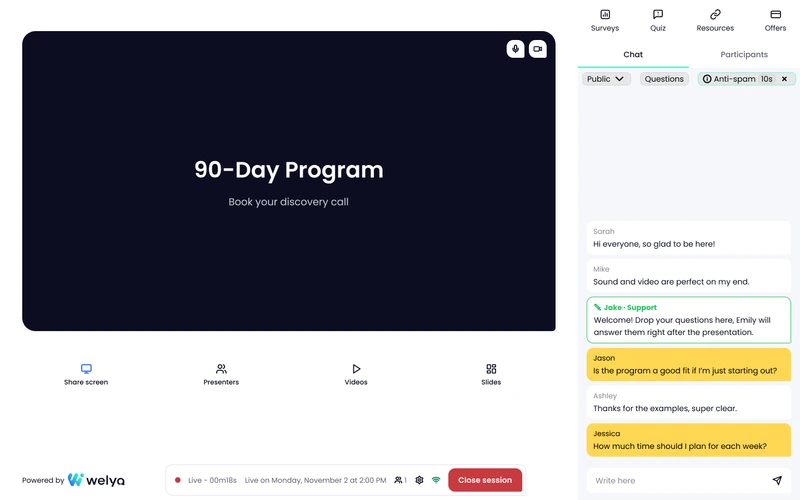
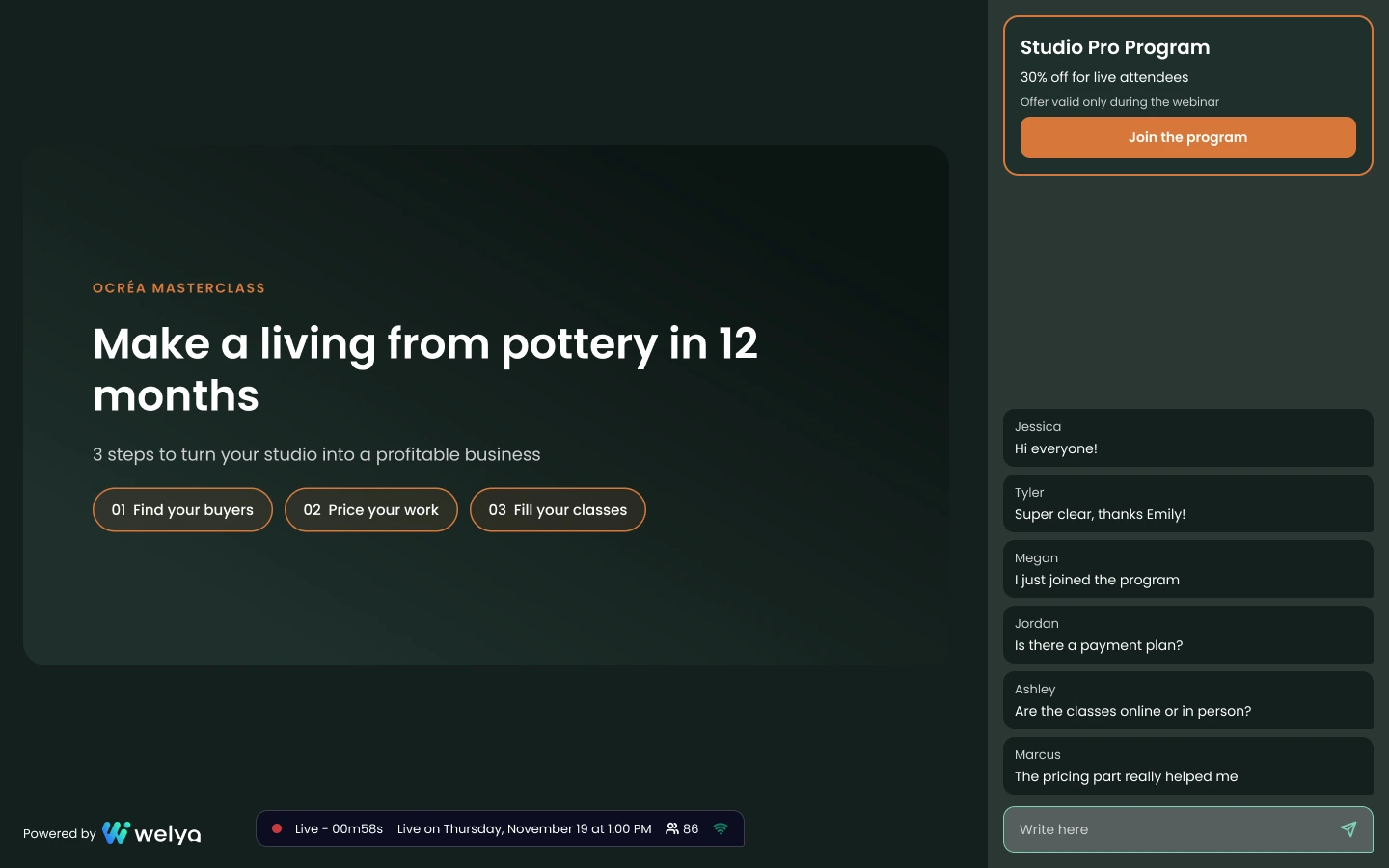
Welya live webinar in a sample brand's colors, dark theme: background, chat and offer in its palette, with the Powered by Welya mention (sample data)
  • 4steps of the attendee journey in your colors
  • 4languages to choose from for your attendees' interface
  • 1setup for every webinar

Why brand your webinars with Welya

Welya gives you a branded webinar, not a white-label platform: attendees see your colors at every step, from the sign-up form to the live chat. The Powered by Welya badge stays visible.

  • Your logo: on the registration page, the waiting room and the thank-you page.
  • Your colors in the live session: chat, offers, quizzes, polls and notifications.
  • Branded, not white-label: your brand leads, next to the Powered by Welya badge.
  • On every plan: branding comes with Launch, and the free account lets you set it up.
  • No design team needed: a light or dark base gives you a readable palette in one click.
  • Interface in the webinar's language: English, French, Spanish or Brazilian Portuguese.

« webinar customization more powerful than any other software I know »

Thibault DidierTrustpilot, translated from French · May 3, 2026

How it works, in 3 steps

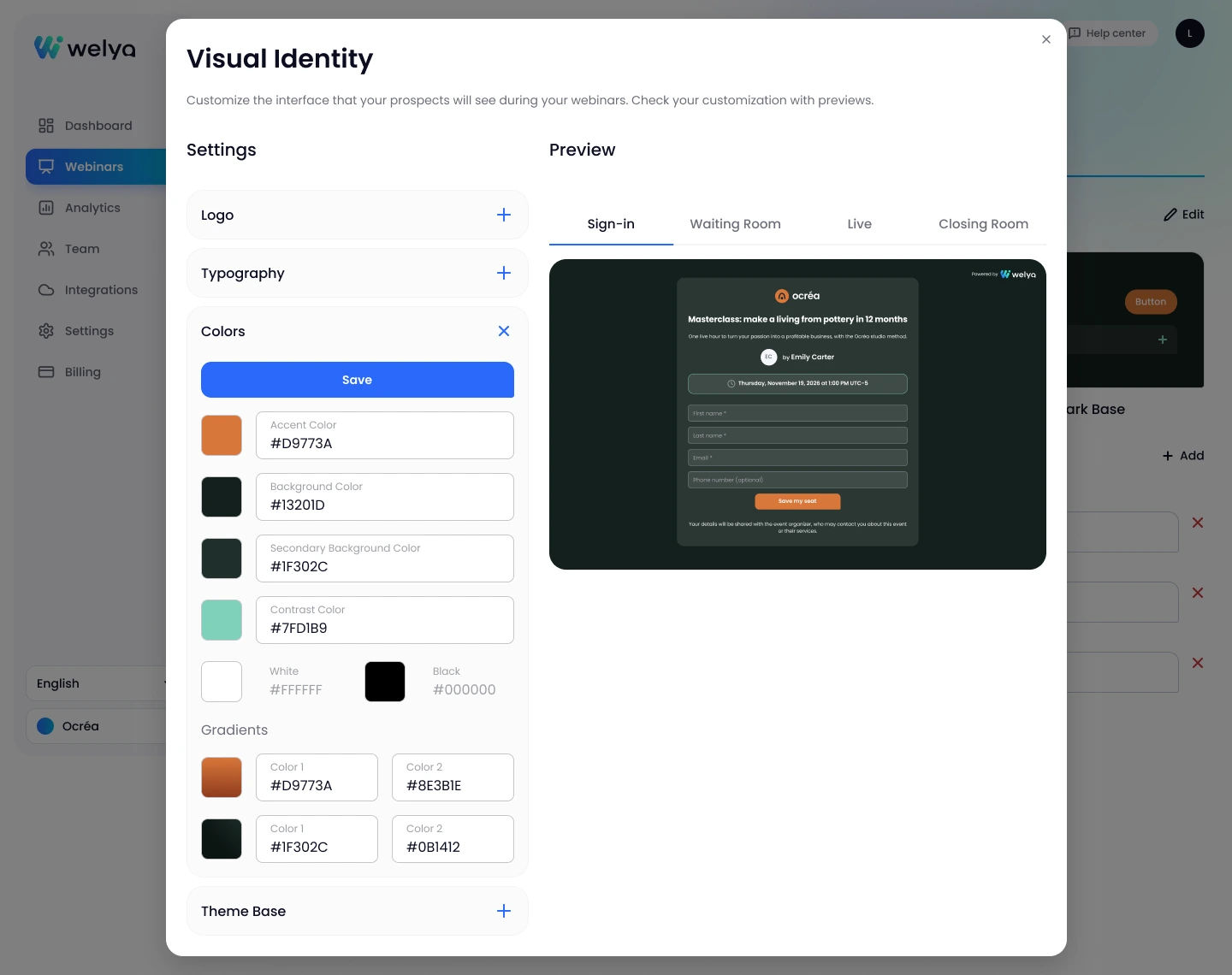
Visual identity settings: brand colors, logo and theme base sections, registration page preview (sample data)

01Build your brand kit once

Your workspace holds one brand kit, and every webinar you create uses it.

  • Logo. Upload an image file, then show or hide it on each of your three pages.
  • Light or dark base. A ready-to-use palette you can fine-tune.
  • Brand colors. Accent, background, contrast, gradients.
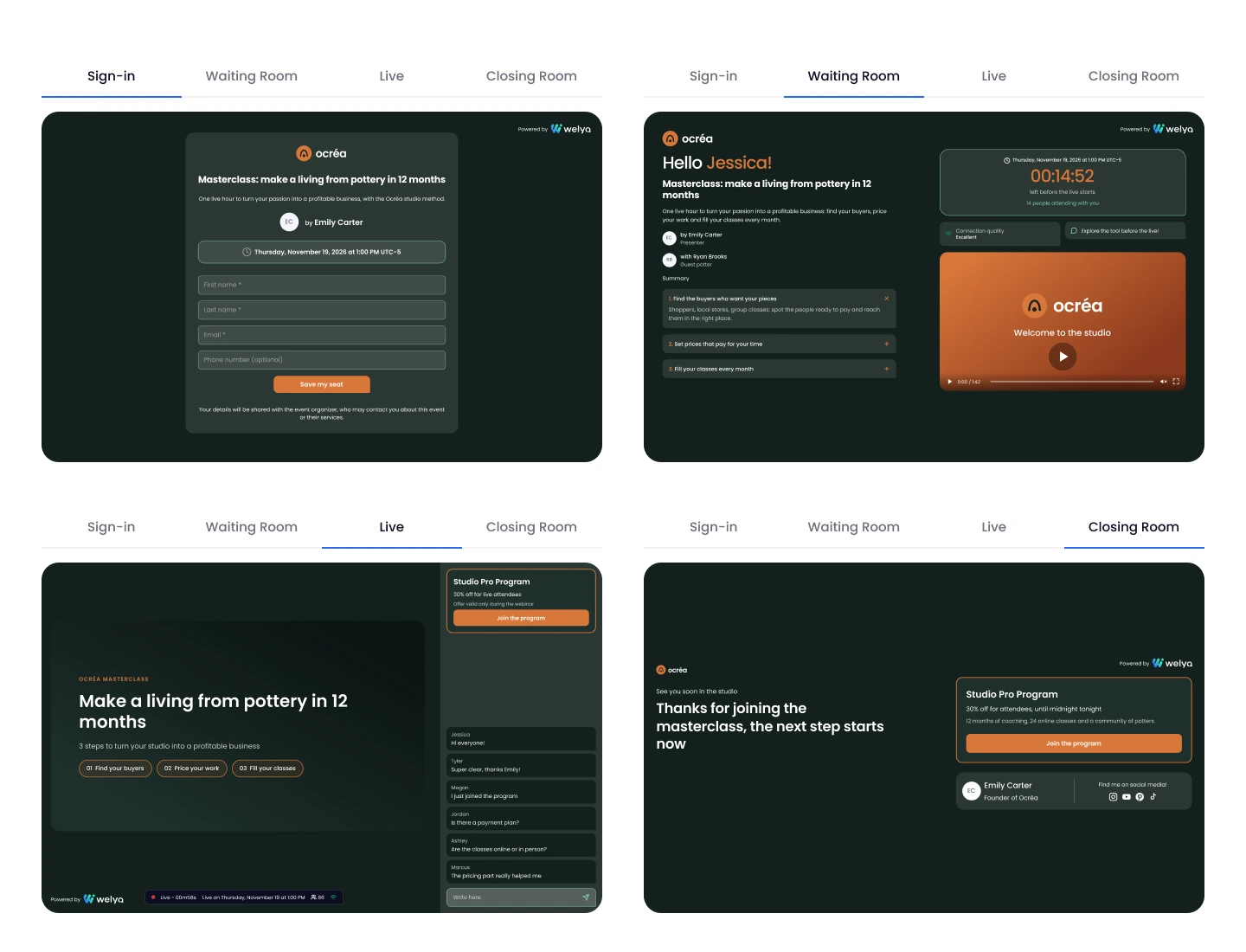
Visual identity previews: registration page, waiting room, live session and closing page (sample data)

02Check all four attendee screens

Before anyone registers, a preview shows your brand kit on each screen your attendees will open.

  • Registration. The form and the button in your colors.
  • Waiting room and live session. Background, chat and offer in your palette.
  • Closing screen. The thank-you page in your colors.
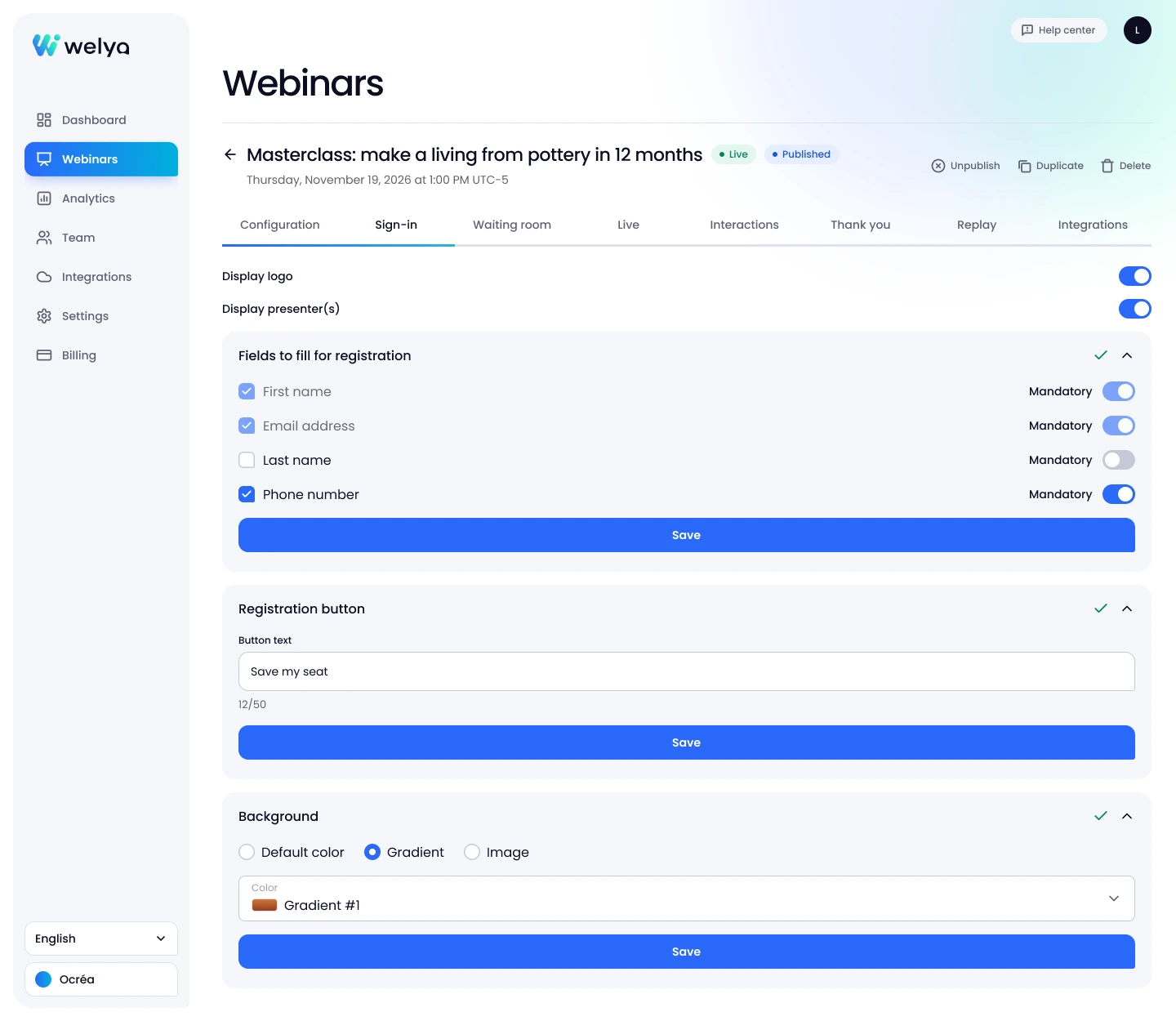
Webinar registration page settings: background, form fields and button text (sample data)

03Fine-tune each webinar

The brand kit stays the same; each webinar gets its own registration, waiting room and thank-you page.

  • Background. A color, a gradient or an image for registration and the waiting room.
  • Form fields. Show or hide each field, then choose whether it's required.
  • Logo and presenters. Shown or hidden on your pages, plus your button text.

What you can brand, screen by screen

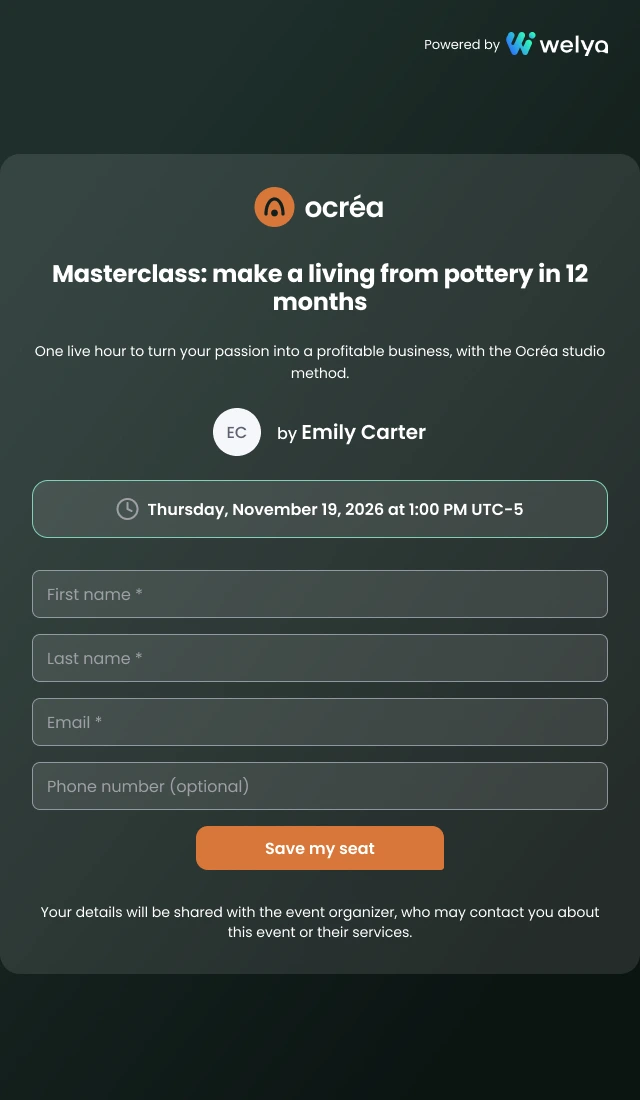
Webinar registration page on mobile, in a sample brand’s colors (sample data)

Registration page: your first impression

Often the first Welya screen a lead ever sees, on desktop or mobile.

  • Logo and colors. On the first screen, before anyone signs up.
  • Presenter photos. Leads see who will be on the webinar.
  • Only the fields you need. Turn each field on or off and set it as required.
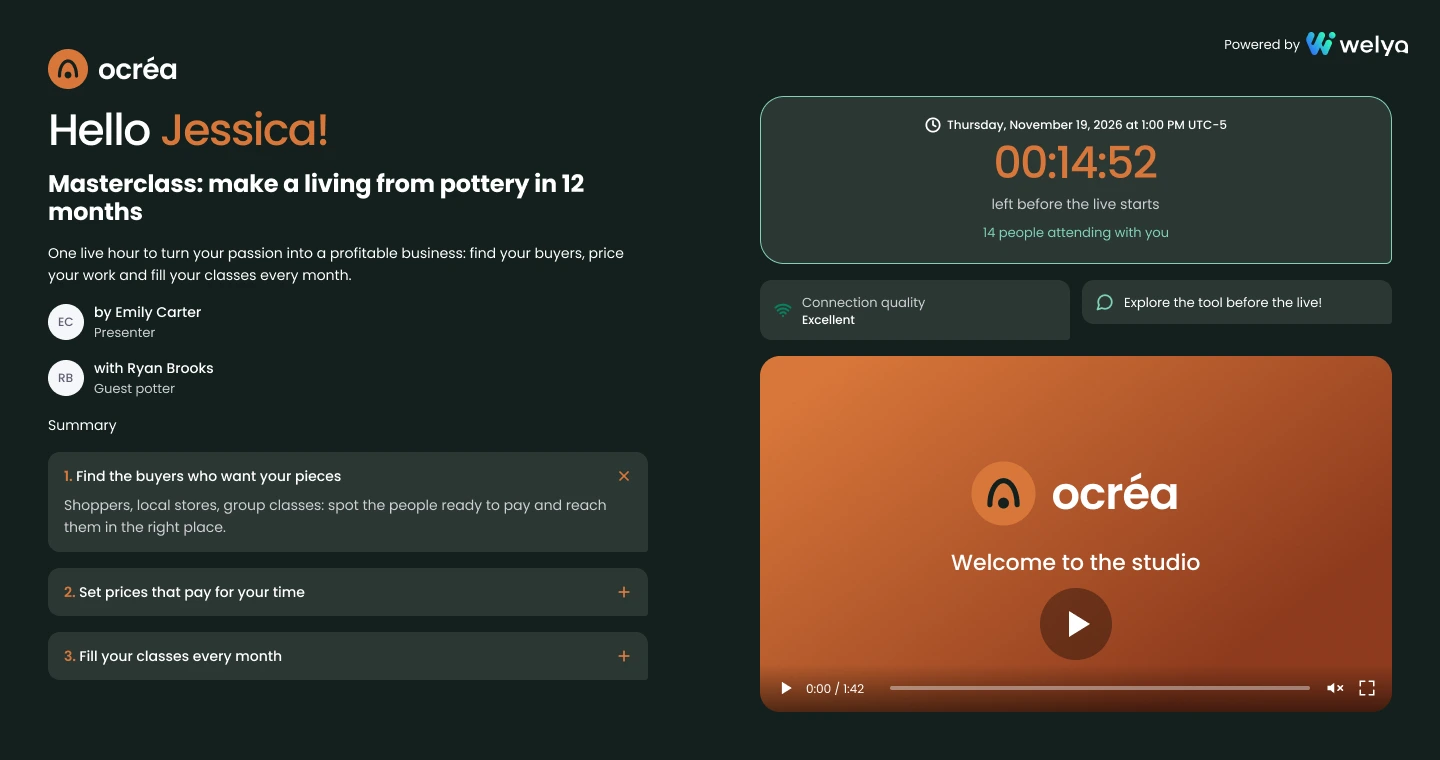
Waiting room as attendees see it: welcome video, agenda and presenters (sample data)

Waiting room: set the scene before you go live

Registrants who arrive early wait on your branded waiting room page, not on a blank screen.

  • Welcome image or video. Introduce the agenda, or yourself.
  • Agenda and presenters. Attendees know what's coming.
  • A quiz or a poll. Keeps early arrivals busy until you start.
Welya live webinar in a sample brand's colors, dark theme: background, chat and offer in its palette, with the Powered by Welya mention (sample data)

Live session: your palette on every interaction

In the live room, branding comes from your colors and theme; your logo stays on your three pages.

  • Background, chat and offer. In your palette; the bottom bar follows your light or dark theme.
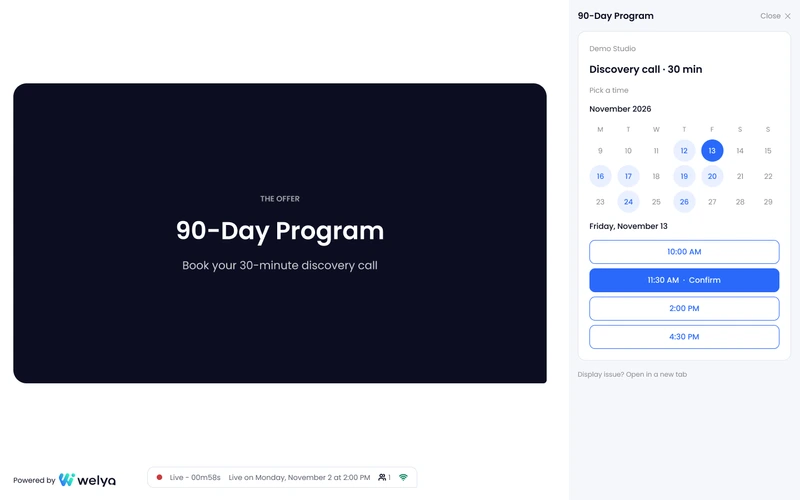
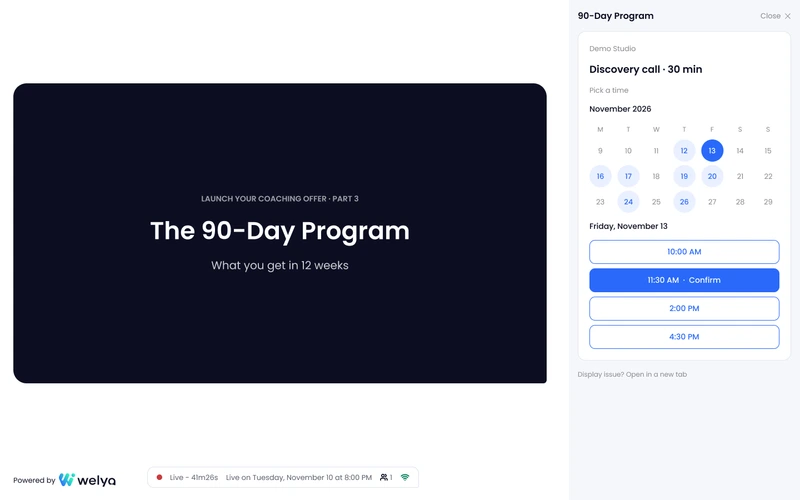
  • Offers, quizzes and polls. Backgrounds and borders taken from your palette.
  • Purchase notifications and statuses. In the same colors as the rest of the room.
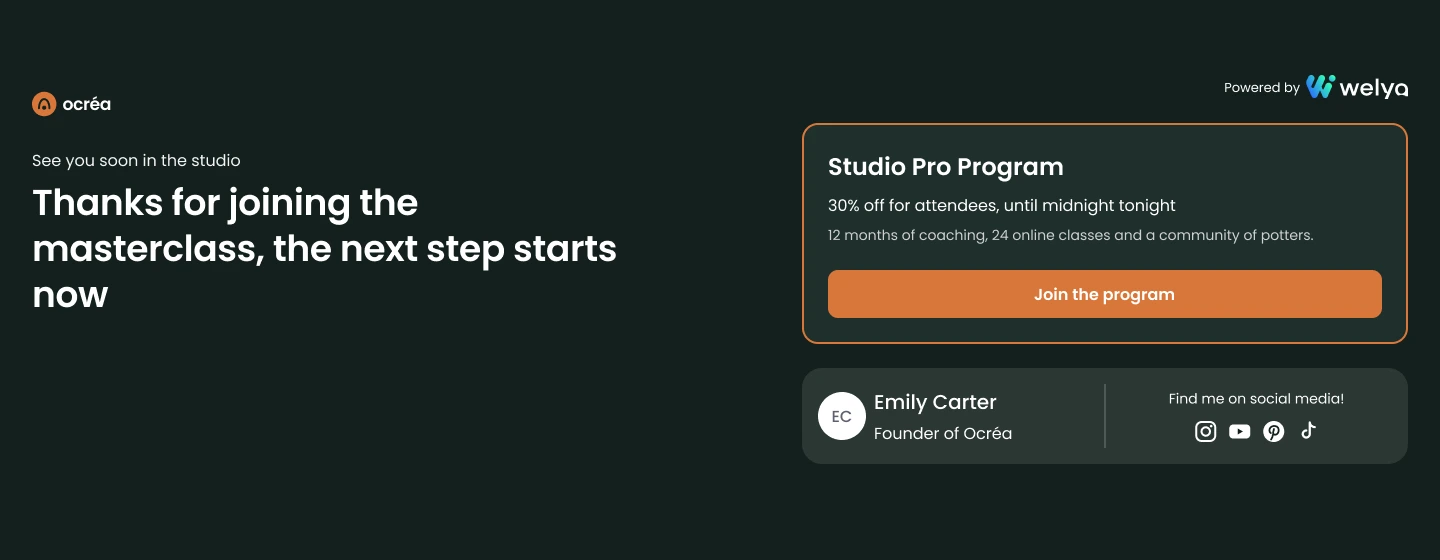
Thank-you page: logo, presenter, social links and offer (sample data)

Thank-you page: the next step after the webinar

When the session ends, the last screen still carries your brand and points to what's next.

  • Your title and message. Thank attendees and share what's next.
  • Profile and social links. Attendees can follow you after the webinar.
  • An offer, an image or a rating. One last action before they leave.
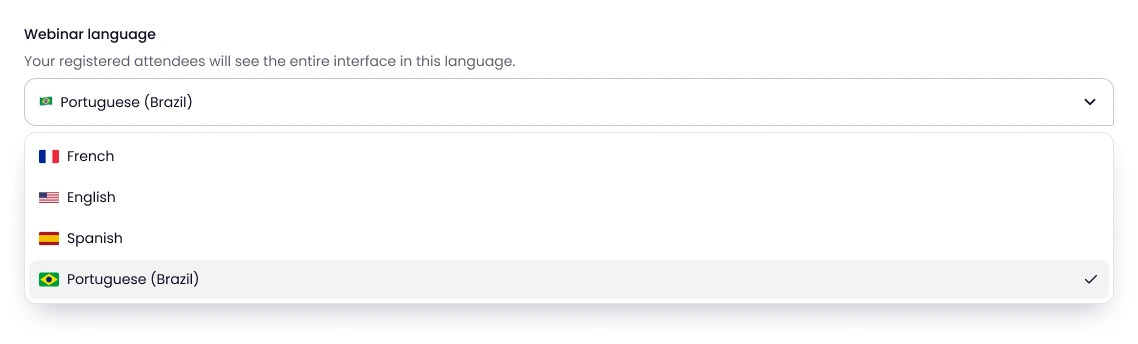
Webinar settings: the “Webinar language” menu open on the four interface languages, Brazilian Portuguese selected (sample data)

Interface language: one per webinar

Running webinars for more than one market? Pick the interface language for each webinar: English, French, Spanish or Brazilian Portuguese.

  • One language per webinar. A US audience today, a Brazilian one tomorrow.
  • The whole attendee interface. Buttons, chat and every attendee page.
  • Your copy, as written. Titles, messages and offers show exactly as you write them.

Set up your branding before your next live session

Set up your branding for free, no credit card required. You only need a subscription to go live in front of your audience.

Get started for free

What changes when you brand your Welya room

FeatureDefaultWith your branding
Registration pageDefault palette, no logoYesYour logo, colors and background
Waiting roomNo media until you add someYesYour image or video, your agenda
Live sessionDefault paletteYesYour palette in the chat, offers and quizzes
Closing pageDefault title and messageYesYour logo, social links and offer

Welya branding that remains visible: the Powered by Welya badge, the welya.io address of your links and the Welya name in the browser tab. Welya isn't a white-label platform and doesn't offer custom domains today. To be confirmed: Custom domains are planned.

They say it better than us

Overall rating: 4.7 out of 5 on Trustpilot (32 reviews)

Reviews translated from French.

Get started for free
  • Welya is innovative, accessible and dynamic.

    Welya is innovative, accessible and dynamic. I appreciated the tool’s rich features, which make for an optimal, memorable and interactive customer experience. Above all, the people…

    Aurélie Narcisot
  • WELYA is just insane!

    Access to lots of DATA, quizzes, polls, waiting room, smooth software and rock-solid support! If you run webinars, YOU HAVE TO try WELYA!

    Sébastien Lagorce
  • Great! Excellent tools.

    Lots of data to improve our funnels. Special mention to the team, super responsive, available and really supportive. I recommend it.

    Alison Carminati
  • It’s really better than WebinarJam and everything we’ve used so far

    I’ve been using Welya for 2 months in my webinar agency, and it’s really better than WebinarJam and everything we’ve used so far (especially the lead scoring).

    Valentin Cordier
  • I use Welya for my webinars, and I wouldn’t go back for anything in the world

    After spending several years testing other traditional webinar platforms, which weren’t at all suited for live conversion. It’s easy to get started, the platform runs smoothly, and the team is …

    Juliette C
  • We’ve used Welya to host our webinars, and we’re very satisfied with the experience.

    The platform is smooth, intuitive, and easy to use for both organizers and participants. The live session went off without a hitch, with excellent stability, and the support team was always responsive …

    Anthony Da Silva
  • Very user-friendly platform

    Very user-friendly platform, with lots of useful features that other competitors don’t have! Customer service is efficient and accessible, it’s a real plus

    Diane Jaurett
  • I’ve been using Welya for two months now, and I’m completely satisfied with it.

    I’ve been using Welya for two months now, and I’m completely satisfied with it. The platform is very intuitive, easy to learn, and a real pleasure to use on a daily basis. It makes communication and …

    Mohamed Boclet
  • My salespeople are performing better and working more efficiently thanks to the data extracted from the webinar in just two clicks with Welya!

    I’ve been hosting online conferences for 9 years and have experienced every technical issue under the sun! It’s such a relief to have a tool optimized for sales and conversion with actionable, …

    Enzo Honoré
  • Welya has resolved all the issues and shortcomings we were facing with WJ.

    As a webinar agency, we used to work with Webinarjam because there weren’t any serious alternatives. Welya was able to resolve all the issues and shortcomings we encountered with WJ. In particular…

    Pierre-Marie Vaillant
  • Welya radically transforms...

    Welya radically transforms the sales experience and makes it easier to engage with the audience. It’s a pleasure to use, and the founders take all our feedback into account. We’ve also seen an increase in …

    Nathan Pissaro
  • I now use Welya for all my clients.

    I now use Welya for all my clients. As someone who often uses platforms like Webinarjam or Zoom, I always had some issues with them and poor lead tracking.

    Thibault Didier
  • The user experience is seamless, simple, and professional

    I switched from WebinarJam to Welya several weeks ago, and honestly, the change has completely transformed the way I host live streams. The user experience is seamless, simple, and professional…

    Kevin Ben
  • It’s clearly better than the traditional solutions on the market. I highly recommend it!

    I’ve been hosting webinars for over a year using solutions like WebinarJam. However, switching to Welya has been a positive change, offering more interaction and better lead analytics...

    Moustapha Moussa Saley
  • The platform I recommend to all my clients:

    I’m Florian Depenne, founder of Monsieur Webinaire. I help consultants, trainers, and coaches design and host their webinars. When I recommend a tool, I stake my reputation on it. Welya, I …

    Florian Depenne
  • An essential tool that we recommend to all our clients as a sales agency

    As CEO of Striker Agency, one of the largest closing and sales agencies on the market, I’m constantly testing and benchmarking tools that can truly make a difference for our clients. Welya is …

    Antoine Contino
  • A top-notch webinar experience and conversion rate!

    My name is Titouan Leroux, and I’m the founder of WebiScale, an agency specializing in webinar production and optimization for our clients. Before switching to Welya, we used WebinarJam.

    Titouan Leroux
  • Designed by and FOR webinar enthusiasts

    I personally implement Welya for the clients I work with, and what can I say other than that it’s flawless? I’ve tested many other tools, which I won’t name so as not to publicly disparage them, but Welya…

    Gérald Durand
  • Business class for webinars

    Huge added value at conversion time thanks to live conversion notifications. I also see a more engaged chat thanks to quizzes and statuses.

    Romain Jottard

Included on every plan

One flat price per plan, based on the size of your webinars. Compare plans.

  • Launch

    $79/monthbilled yearly

    • 500 attendees
    • 2 hours per webinar
    • 2 presenters
    • 5 team members
  • Grow

    $229/monthbilled yearly

    • 2,000 attendees
    • 3 hours per webinar
    • 4 presenters
    • 10 team members
  • Scale

    $370/monthbilled yearly

    • Unlimited attendees
    • 12 hours per webinar
    • 6 presenters
    • 25 team members

Questions? We’ve got answers.

1. Branded, not white-label: what does that mean?

Your brand leads, and a few Welya elements remain: the Powered by Welya badge, the welya.io links and the browser tab name. Welya doesn't offer white-label, meaning a version you could resell under your own brand.

2. Can I hide the Powered by Welya badge?

No. It shows on your pages, in the live session and in the replay. Around it, attendees see your colors at every step and your logo on the registration, waiting room and thank-you pages.

3. Can I use my own domain?

Not today: your links stay on a welya.io address. To be confirmed: Custom domains are planned. You can keep the registration form on your own site: it registers attendees in Welya through the API (compatible with Make via webhooks and API keys), and the live session runs on Welya.

4. Do I need a designer?

No. Pick a light or dark base for a readable palette, add your logo and color codes, then check the preview of each screen before you publish.

5. Does my branding apply to every webinar?

Yes. Set once by your workspace admins, your branding applies to every webinar. Registration, waiting room and thank-you pages can then be adjusted webinar by webinar.

6. Can an agency run several brands?

Each workspace has its own branding and subscription, and one account can belong to several workspaces. For a new brand, create a new workspace by opening an account for it.

7. Are registration and reminder emails branded?

They're sent by your email tool, with the branding you set up there: Welya doesn't email your registrants. It notifies your tool of each registration through a webhook (compatible with Make via webhooks and API keys).

8. Which plan includes branding?

Every plan, from Launch. The free account, no credit card required, lets you set up your branding and pages; you only need a subscription to go live in front of your audience.

Put your brand on your next webinar