
You’re a setter. Your mission: call the webinar viewers who didn’t book a call during the live session, and convince them to do it. It’s contextualized cold calling, or at least, it should be.
Except that with traditional webinar platforms, your day-to-day looks like this: you get a list of contacts with a first name, an email and a phone number. That’s it. Very little context. Very little data on what the person did during the live session.
You pick up the phone and call blind. The person isn’t expecting you. Your hook is generic. And all too often, the call falls flat.
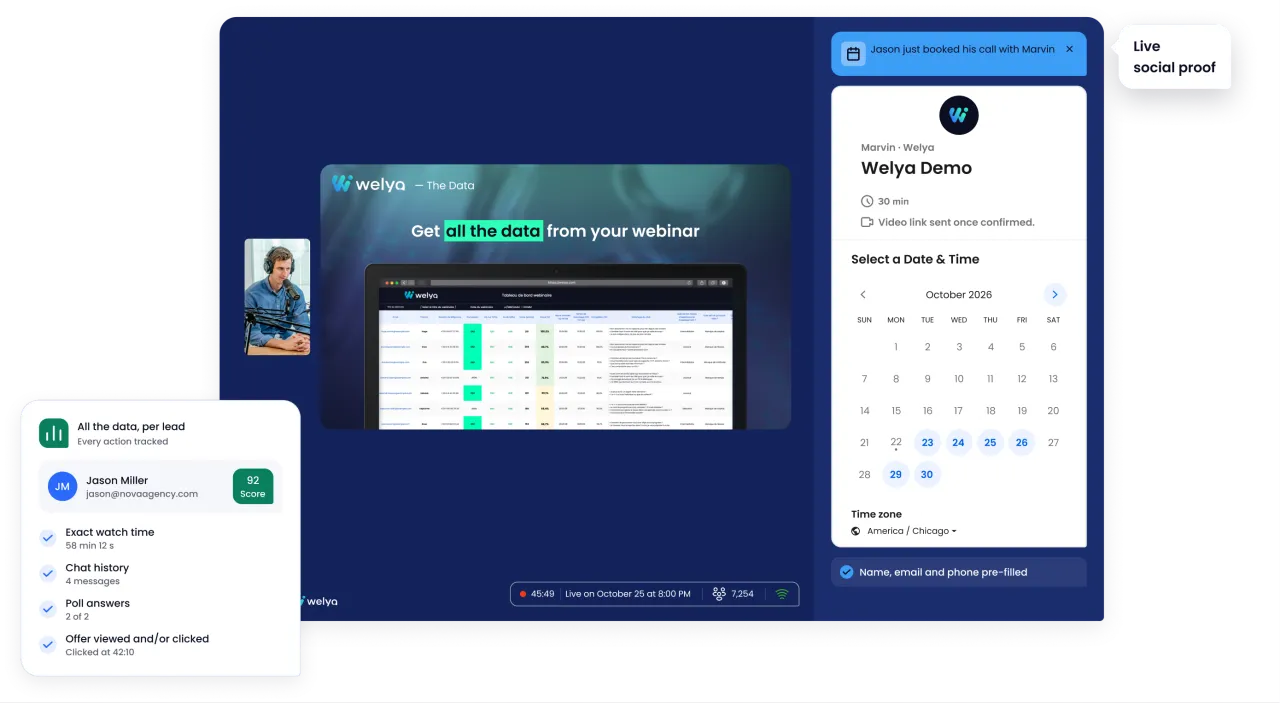
What if you could know exactly what a viewer did, said and thought during the webinar, before you even dial their number? That’s exactly what Welya makes possible. With nearly 30 data points per attendee, sent to your CRM (webhooks, Make, export), Welya gives setters the weapon they were missing: context. Your cold call becomes a warm call.
Post-webinar warm calling means turning the classic cold call into a contextualized call thanks to the behavioral data captured during the webinar: scoring, chat, polls, quizzes, watch time. The setter goes from a blind call to a prepared call with a complete file on every contact.
Why post-webinar setting is so hard today
The most under-equipped role in the sales chain
In the webinar ecosystem, everyone has data except you. Infopreneurs have analytics. Media buyers have ad metrics. And you? You have… a list of names.
It’s a paradox: you have to convince the hardest contacts (the ones who didn’t book a call), but you have the least information to do it.
What traditional tools give you
With a platform like Zoom, YouTube Live, WebinarJam or Livestorm, here’s all the data you sometimes get:
- First and last name
- Email address
- Login time
- Logout time
That’s it. No context. No scoring. No interaction history.
You’re calling someone you know absolutely nothing about, other than that they attended a webinar.
The 3 frustrations you know all too well
- No way to prioritize: There’s no telling who’s hot and who’s just curious. You treat 200 contacts the same way.
- Zero context for your hook: Your first words on the phone are generic. The person hangs up mentally before you’ve finished.
- Extremely low conversion rate: Without context, few calls turn into booked appointments.
Welya: the tool that turns cold calls into warm calling
Welya isn’t just a video streaming tool. It’s a webinar platform built for conversion that captures nearly 30 data points per attendee and sends them to your CRM (webhooks, Make, export).
For you, everything changes: you go from zero context to a complete file on every person you call. What some call smart calling (data-driven prospecting) becomes your everyday reality.
Complete table of Welya data you can use in setting
| Category | Available data | Impact on your call |
|---|---|---|
| Identity | Last name, first name, email, phone | Contact basics for the call |
| Time engagement | Watch time, arrival/departure time | Know whether the person watched 10 min or 90 min |
| Reason for leaving | Exit reason (if provided) | Understand why they left |
| Chat | Full message history | A gold mine for your phone hook |
| Polls | Answers to every poll run during the live session | Identify profile, budget, obstacles |
| Quizzes | Answers to interactive quizzes | Assess their level of knowledge |
| Offer | Did they see the offer? Did they click? | Know where the person stands relative to the offer |
| Scoring | Automatically calculated overall score | Prioritize your calls: hottest first |
The value gap: with vs. without Welya
| Criterion | Without Welya | With Welya |
|---|---|---|
| Available data | 2-4 (name, email, login) | nearly 30 data points per attendee |
| Hook context | None | Chat, polls, scoring, label |
| Prioritization | Impossible | Automatic scoring |
| Conversion rate | Low (pure cold call) | Higher (contextualized warm calling) |
| Time per call | Long (discovery from scratch) | Short (context already known) |
6 concrete techniques for using Welya data in setting
Technique 1: Spot the “almost booked” with offer visibility
Welya tells you whether a viewer saw the offer and whether they clicked on it without booking a call. These contacts are your best opportunities.
- Saw the offer + clicked + NO call booked → Red-hot contact. Priority call.
- Saw the offer + didn’t click → They hesitated. Reframe the value.
- Didn’t see the offer (left before) → Present it from scratch.
Tip: “Saw + clicked + no call” contacts are your gold mine. To restate the value without redoing the webinar, reuse the structure of your sales pitch.
Technique 2: Sort your calls by score to pre-qualify your leads
It’s rule number 1 of smart setting: don’t treat every contact the same way. Welya scoring lets you pre-qualify your leads using webinar data, before you even pick up the phone.
| Welya score | Priority | Timing | Strategy |
|---|---|---|---|
| 70-100 | Same day or the next morning | +8 hours | Personalized hook, get straight to the point |
| 40-69 | Two days later | +24 to +48 hours | Consultative hook |
| 0-39 | Email first | +3 to +4 days | Email nurturing, then a call if they engage |
Tip: High-scoring contacts who didn’t book a call are often the ones who got interrupted or are hesitating. A call within 2 hours or the next morning can tip the decision.
Technique 3: Personalize your hook with the chat history
It’s the most powerful technique for a setter. The webinar chat contains the viewer’s real concerns. Copywriters can use it too, to write sharper follow-up emails.
“Hi Marie, it’s Thomas. You attended yesterday’s webinar on [topic]. I saw that you asked a really insightful question about [their exact question]. I’m calling to answer it in detail.”
“Hi Jean, it’s Sophie. I noticed that during the webinar, you mentioned you work in [X]. We’ve actually had very concrete results with professionals like you.”
Why it changes everything: You’re no longer a stranger cold calling. The wall of distrust comes down.
- “Your comment about [topic] stuck with me, I wanted to share a similar experience”
- “You mentioned [obstacle/goal] in the chat, that’s exactly why I’m calling”
- “I saw you were very active during the live session, the topic clearly resonates with you”
Technique 4: Use poll answers to qualify upfront
Polls run during the webinar are free pre-qualification.
| Poll answer | Inferred profile | Phone hook | Call goal |
|---|---|---|---|
| “Budget: $0-1,000” | Tight budget | Show the concrete return | Handle the budget objection → booked call |
| “I want to think about it” | Undecided | Suggest a short conversation | Safe space → booked call |
| “Revenue > 100K, wants to scale” | High potential | Concrete scaling results | Direct pitch, quick booking |
| “I’m a complete beginner” | Beginner | Make the first steps tangible | Education → exploratory call |
Technique 5: Use the moment they left to adapt your message
| When they left | What they missed | Call strategy |
|---|---|---|
| First 10 minutes | Almost everything | Poorly qualified. Nurturing email first. |
| Middle of the webinar | The offer and the ending | Summarize the key points + present the offer. |
| Right before the offer | Only the offer | Present the offer as a natural add-on. |
| After the offer, without acting | Nothing, they saw everything | Very hot contact. A call can unlock everything. |
| Left and came back | Varies | Strong curiosity. Mention their interest. |
Technique 6: Build dynamic scripts based on the 4 personas
| Profile | Welya criteria | Hook | Goal | Length |
|---|---|---|---|---|
| The frustrated | Score 70+, offer seen/clicked | What held you back? | Book the call right away | 5-7 min |
| The interested | Score 40-69, active in chat | I saw your questions about [topic] | Link + booked call | 8-12 min |
| The silent engaged | Score 30-50, stayed a long time | The topic clearly resonates with you | Qualify → booked call | 10-15 min |
| The distant curious | Score < 30, left early | Email first | Nurturing |
Automatic integration with your CRM
Nearly 30 data points in every record
All Welya behavioral data is sent to your CRM (webhooks, Make, export), even for contacts who did NOT book a call.
This is the key for you: with traditional tools, “no call” contacts have almost no data in the CRM. With Welya, every viewer has an enriched profile.
Compatible tools
- CRM: GoHighLevel (dedicated app); Pipedrive, Salesforce, HubSpot, Zoho via Make
- Calendar / booking: Calendly, Cal.com, GoHighLevel calendar
- Email marketing: ActiveCampaign (tag); Brevo, ConvertKit, Mailchimp via Make
The setter’s workflow with Welya
- The webinar ends
- The data is sent to the CRM
- You filter: “contacts WITHOUT a booked call, sorted by descending score”
- You open the first contact’s record: score 85, 3 chat messages, offer seen and clicked
- You dial with a complete file in front of you
That’s the difference between a cold call and an enriched warm call. Once the call is booked, the closer can pick up the same file: here’s how to prepare a closing call with webinar data.
Recap: before Welya vs. with Welya for setters
| Criterion | Without Welya | With Welya |
|---|---|---|
| Data per contact | 2-4 (name, email, login) | nearly 30 data points per attendee |
| Hook context | None | Chat, polls, quizzes, scoring, label |
| Prioritization | Impossible | Automatic scoring |
| Personalization | Generic | Based on chat, polls, engagement |
| Objection anticipation | None | Poll answers available |
| Offer awareness | Unknown | Know if seen/clicked |
| Conversion rate | Low (pure cold call) | Higher (contextualized warm calling) |
| Time per call | Long | Short (context already known) |
| CRM integration | Manual or very limited | Webhooks, Make, export |
| Continuous improvement | Impossible (no data) | Analysis by score, profile, exit point |
Conclusion: from cold call to warm call with Welya
With traditional tools, you call blind. With Welya, you call with nearly 30 data points per attendee right in front of you. Your cold call becomes a warm call. And every minute on the phone becomes productive. Discover Welya and turn your viewer lists into a pipeline of qualified calls. Freelancing for several course creators? The affiliate program pays you on subscriptions that come through your link, under the program’s terms. To go further, browse our guides to selling with webinars.